WordPress is one of the most popular website-building platforms, loved by both beginners and professionals for its flexibility and ease of use. However, choosing the right WordPress editor can make a significant difference in your workflow, creativity, and productivity. In this post, we’ll explore the best WordPress editors, examining their unique features, ease of use, and customization options.
Why Choosing the Right WordPress Editor Matters
Your choice of WordPress editor determines how easily you can design, customize, and manage your website. A good editor allows you to:
- Customize layouts with ease
- Add complex design elements without coding
- Optimize content for SEO
- Preview and adjust design for mobile, tablet, and desktop views
- Speed up your workflow with drag-and-drop features
Whether you’re a beginner or an experienced developer, finding the right editor can help you create beautiful, functional websites faster.
Classic Editor vs. Block Editor (Gutenberg)
When WordPress introduced the Block Editor (Gutenberg) in 2018, it transformed how content is created on the platform. Here’s a breakdown of each:
- Classic Editor: Ideal for those who prefer a simple, text-based experience. This editor uses a familiar WYSIWYG interface, making it a great option for bloggers and content creators who don’t need advanced design elements.
- Gutenberg (Block Editor): A block-based editor that enables more flexibility. With Gutenberg, you can add blocks for paragraphs, images, videos, and more, making it easier to create complex layouts and custom pages without additional plugins.
Both editors have their pros and cons, but for those seeking even more customization, several other editors are available as plugins.
Top WordPress Editors for Enhanced Customization and Design
Below are some of the most popular WordPress editors, each with unique features to help streamline website creation.
Elementor
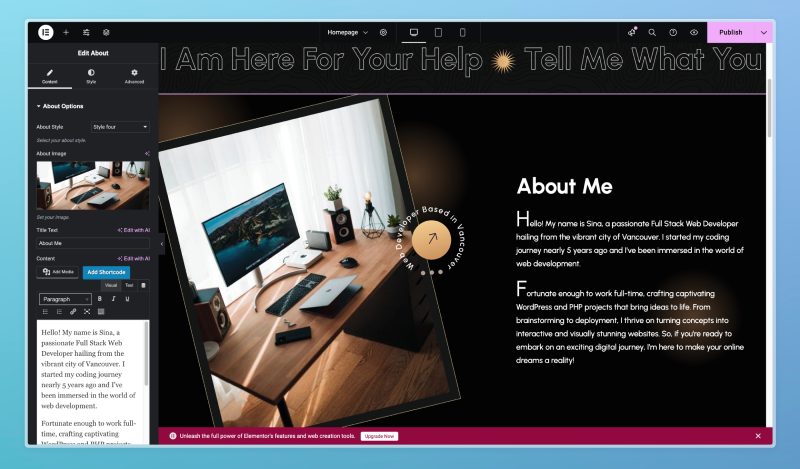
Elementor is one of the most widely-used WordPress editors, known for its user-friendly, drag-and-drop functionality. It allows users to create highly customized layouts without any coding.
Key Features:
- Real-time live editing
- Hundreds of templates and widgets
- Responsive design options
- Global settings for design consistency
- Supports WooCommerce, making it ideal for e-commerce websites
Pros:
- Excellent for beginners and professionals alike
- Huge library of templates and blocks
- Built-in popup and form builders
- Extensive customization options
Cons:
- Requires a premium subscription for advanced features
- May slow down website speed if not optimized properly
Beaver Builder
Beaver Builder is another popular drag-and-drop editor that is both powerful and easy to use. It offers a clean interface and a focus on fast, reliable editing.
Key Features:
- Front-end visual editing
- Pre-made templates for quick page building
- Multisite capabilities for managing several sites
- Custom CSS and JavaScript support
Pros:
- Intuitive user interface
- Great for creating professional layouts quickly
- Lightweight and optimized for performance
Cons:
- Limited widget options compared to other builders
- The free version has fewer features than competitors
Divi Builder
Divi Builder, part of the Divi theme by Elegant Themes, is one of the most versatile and feature-rich WordPress editors available. It’s a powerful tool for building any type of website.
Key Features:
- Drag-and-drop visual builder with inline editing
- Real-time design preview
- Hundreds of pre-made templates
- Advanced design capabilities, including custom CSS and animations
Pros:
- Extremely customizable with a wide range of design options
- Affordable as part of Elegant Themes membership
- Strong community and customer support
Cons:
- Steeper learning curve due to many advanced options
- Can be overwhelming for beginners
WPBakery Page Builder
WPBakery (formerly known as Visual Composer) is another popular WordPress editor that offers both back-end and front-end editing.
Key Features:
- Backend editor for structured layout control
- Frontend editor for real-time preview and editing
- Responsive design options for all devices
- A variety of add-ons for extended functionality
Pros:
- Great for creating both simple and complex layouts
- Extensive library of add-ons and third-party integrations
- Often bundled with popular premium themes
Cons:
- Interface feels less modern than other page builders
- Can be slow if too many elements are added
Brizy
Brizy is a newer WordPress editor but has quickly gained popularity due to its clean, minimalistic interface and ease of use. It is perfect for beginners and those looking for a straightforward editor.
Key Features:
- Drag-and-drop builder with real-time editing
- Pre-designed blocks for fast layout creation
- Easy customization options for fonts, colors, and styles
- Fully responsive for mobile, tablet, and desktop
Pros:
- Fast and user-friendly
- Great selection of pre-designed blocks
- Affordable compared to some other page builders
Cons:
- Fewer advanced customization options than some competitors
- Limited third-party integrations
Thrive Architect
Thrive Architect is a WordPress editor primarily geared towards marketers. It’s designed to create high-converting landing pages and sales funnels.
Key Features:
- Focused on conversion optimization with CTA and lead-generation elements
- Drag-and-drop editor with visual preview
- Pre-built templates for landing pages, opt-ins, and more
- Integrates with most email marketing platforms
Pros:
- Excellent for creating landing pages and marketing-focused content
- High degree of customization for lead-gen elements
- Affordable one-time payment option
Cons:
- Not as intuitive for general-purpose website building
- Limited design options outside of marketing elements
Factors to Consider When Choosing a WordPress Editor
When selecting the best WordPress editor for your site, keep in mind these key considerations:
- Ease of Use: Beginners might prefer Elementor or Brizy, while advanced users may appreciate the flexibility of Divi Builder or Thrive Architect.
- Features: Consider what features are most important for your site, such as templates, third-party integrations, or responsive design options.
- Performance: Some editors can affect website speed, especially if they are heavy on animations or custom code. WPBakery and Beaver Builder tend to be more lightweight.
- Pricing: Some editors are free, while others offer premium subscriptions or one-time payments. Elementor, for instance, has both free and premium versions.
- Support and Community: For troubleshooting and design ideas, having access to a supportive community or responsive customer service can be a big help.
Conclusion: The Best WordPress Editors for Every Need
Choosing the best WordPress editor depends on your unique needs and level of experience. Elementor and Divi Builder are fantastic for users who want maximum flexibility and design options, while Brizy and Beaver Builder are ideal for beginners looking for an easy setup. Thrive Architect stands out for marketers, and WPBakery is a solid choice for those seeking compatibility with various themes and plugins.
Each editor has strengths and is tailored to different goals, from creating simple blogs to complex business websites. Whether you’re a novice or an advanced user, there’s a WordPress editor that will help bring your vision to life!
FAQs
What is the difference between the Classic Editor and Gutenberg?
The Classic Editor is a simple text-based editor, while Gutenberg (Block Editor) allows more design flexibility with block-based elements for easier layout customization.
Is Elementor free?
Yes, Elementor offers a free version with limited features, but for advanced tools, a premium subscription is available.
Which WordPress editor is best for beginners?
Elementor and Brizy are both user-friendly and ideal for beginners who want an intuitive drag-and-drop interface.
Does using a page builder slow down my WordPress site?
Some page builders can slow down your site if not optimized properly. Lightweight options like Beaver Builder are generally better for performance.
Can I use multiple editors on one WordPress site?
Yes, but it’s generally not recommended as it can cause conflicts between styles and settings, slowing down your website.
Which editor is best for e-commerce websites?
Elementor and Divi Builder both support WooCommerce, making them excellent choices for e-commerce websites.